What is a Trackball Mouse A Powerful Guide You Must Read
Published: 13 May 2026
Not every computer tool works in the same way, and the what is a trackball mouse device is a good example of that difference. At first glance, it feels unusual because it replaces the normal sliding movement with a fixed design and a rotating ball. The user does not move the mouse across the table; instead, they control everything from a single point.
Based on my experience with different hardware tools, this design often surprises users because it feels different at first, but becomes very natural after short use. In this article, we have covered what a trackball mouse is and how it actually works in real use, so you can clearly understand whether it fits your needs or not.
Stay with me as we explore more about what is a trackball mouse and how it works in real use.
Simple Definition of Trackball Mouse
A trackball mouse is a computer input device that uses a rotating ball to move the cursor on the screen. The device stays in one position, so users control movement with their fingers or thumb instead of moving the whole mouse.
Many people use it for better control and smoother navigation during daily computer tasks. It also works well in small desk spaces where a regular mouse may feel uncomfortable.
- Controls the cursor with the rolling ball
- Stays fixed during computer use
- Supports smooth pointer movement
- Works well in limited spaces
- Reduces extra hand movement
History of Trackball
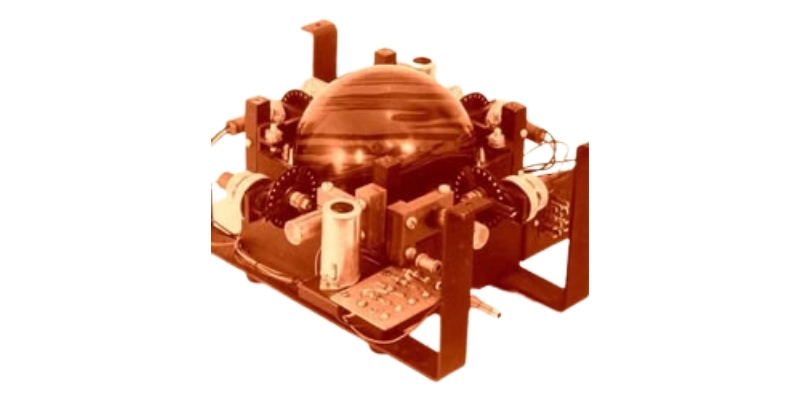
The trackball has a long and interesting history in the world of computer technology. Engineers first created this device to improve cursor movement in military and radar systems before personal computers became common.
As technology improved, companies introduced trackballs for office work, creative tasks, and home use. Today, many users still prefer trackballs because they provide comfort, accuracy, and smooth control.
- 1940s military research: Engineers tested early trackball concepts in defense and navigation control systems.
- 1952 Canadian project: The Canadian Navy developed a trackball for radar tracking operations and monitoring tasks.
- Large metal components: Early devices used heavy balls and mechanical parts for cursor movement control.
- 1960s computer experiment: Technology researchers explored trackballs for advanced computing and screen navigation purposes.
- 1980s office adoption: Companies started selling trackballs for personal computers and workplace computer setups.
- 1990s laptop usage: Several laptops included built-in trackballs before touchpads became more widely accepted.
- 2000s creative workflows: Designers and editors preferred trackballs for detailed movement and accurate screen control.
- Modern ergonomic designs: Current trackballs now focus on comfort, precision, wireless support, and smoother performance.
How Does a Trackball Mouse Work?
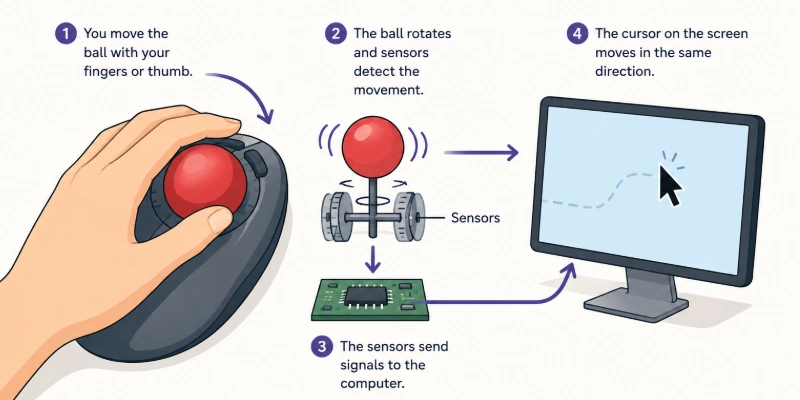
A trackball mouse works in a different way from a normal mouse because it stays fixed on the desk. Instead of moving the whole device, the user controls the cursor by rolling a small ball with fingers or a thumb.
Inside the mouse, sensors detect the movement of the ball and convert it into cursor motion on the screen. This makes control more stable, accurate, and comfortable for long computer use.
- Finger movement control: Users rotate the ball with fingers to move the cursor smoothly.
- Sensor tracking system: Built-in sensors detect the direction and speed of the ball instantly.
- Fixed desk position: The device does not move and stays stable during full use.
- Cursor response action: The screen pointer follows the exact direction of ball movement.
- Reduced hand strain: Users avoid repeated wrist movement and work more comfortably.
- Button function control: Side buttons help with clicking, selecting, and dragging tasks.
- Precision performance use: It supports detailed work like design and editing tasks.
- Simple operating style: Users learn quickly because only ball control is needed.
What Is a Trackball Used For?
A trackball is used to control a computer cursor in a more stable and precise way. Instead of moving a normal mouse across a surface, users rotate a small ball to move the pointer on the screen. This makes it useful in situations where space is limited or steady control is needed. Many people use it for comfort, accuracy, and better handling during long periods of computer work.
- Graphic design work: Designers use trackballs for detailed editing, smooth control, and precise movement in creative software.
- Office productivity tasks: Users manage documents, spreadsheets, and emails with easier and more controlled navigation.
- Limited desk space: People work comfortably even when there is very little space for mouse movement.
- Long computer sessions: It helps reduce hand strain and keeps users comfortable during extended work hours.
- Gaming control use: Some gamers prefer it for stable aiming and accurate cursor handling in specific games.
- Video editing tasks: Editors use it for fine timeline adjustments and frame-by-frame control.
- Accessibility support: It assists users who find it difficult to move a traditional mouse smoothly.
- Industrial systems use it: It is used in control rooms and machines where precise and fixed control is required.
Types of a Trackball Mouse
A trackball mouse comes in different types based on how users control the ball and how they interact with the device. Each type is designed to suit different working styles and comfort levels. Some people prefer thumb control, while others like finger-based movement for better accuracy. Understanding these types helps users choose the right option for their daily computer tasks.
- Thumb-controlled type: Users move the cursor by rotating a ball with their thumb while keeping other fingers on the buttons for easy control.
- Finger-controlled type: Users control the ball with their index or middle finger, which gives more precise and detailed cursor movement.
- Ambidextrous design: This type allows both left-handed and right-handed users to operate the device comfortably.
- Stationary desktop type: The trackball stays fixed on the desk and offers stable control for office and professional work setups.
- Portable compact type: Small-sized models support easy carrying and are useful for travel or mobile working environments.
Advantages of Trackball
A trackball offers several benefits that make it useful for different types of computer users. It changes the way people control the cursor by keeping the device fixed in one place. This design helps improve comfort, accuracy, and working speed in daily tasks. Many users prefer it because it feels stable and easy to control.
- Better hand comfort and ease
- High accuracy for precise control
- Works in small desk spaces
- Reduces wrist and arm movement
- Provides stable cursor navigation always
Disadvantages of Trackball
A trackball mouse is useful in many situations, but it also has some drawbacks that users should understand. It works differently from a normal mouse, so new users often need time to adjust. Some people may find it less natural at first because of its unique control style. It is important to know these limits before choosing it for daily use.
- Learning curve for new users
- Less natural for beginners initially
- The ball needs regular cleaning often
- Not ideal for fast gaming
- Higher cost than basic mice
Features of a Trackball Mouse
A trackball mouse comes with several unique features that make it different from a standard computer mouse. It uses a fixed body design where only the ball moves to control the cursor. This setup helps users work with more control and less physical movement. Many people choose it for comfort, precision, and easy handling in daily tasks.
- Stationary design: The device stays fixed on the desk while users control the cursor using only the rolling ball for movement.
- Rotating ball control: A smooth ball allows users to move the pointer in all directions with simple finger or thumb motions.
- Precision tracking: Built-in sensors detect even small movements and convert them into accurate screen navigation.
- Multiple buttons: Extra buttons support actions like clicking, selecting text, dragging items, and quick shortcuts.
- Ergonomic shape: The design supports a natural hand position and helps reduce strain during long working hours.
- Wireless option: Many models connect without cables, giving users a cleaner desk and a more flexible setup.
- Adjustable speed: Users can control pointer sensitivity to match slow, detailed work or faster movement needs.
- Low space use: It works comfortably even in tight work areas where a normal mouse cannot move freely.
Applications of a Trackball Mouse
A trackball mouse is used in many professional and everyday environments where users need accuracy, comfort, and stable control. It allows people to work without moving the whole device, which makes it very useful in different situations. Many industries prefer it because it saves space and improves precision in detailed tasks. It also supports long working hours with less hand movement and better control.
- Graphic design work: Designers use it for detailed editing, smooth navigation, and precise control in creative software projects.
- Office productivity tasks: Users handle documents, spreadsheets, emails, and presentations with easier and more stable cursor movement.
- Video editing work: Editors manage timelines, trim clips, and make fine adjustments with better accuracy and control.
- Small desk spaces: It works perfectly in tight areas where moving a normal mouse is difficult or limited.
- Medical equipment use: Professionals operate machines and control panels where steady and accurate movement is required.
- Industrial systems control: Operators manage technical systems and machines with stable cursor handling in control rooms.
- Accessibility assistance: It helps users who face difficulty using traditional mice due to hand or wrist issues.
- Technical and lab work: Engineers and technicians use it for testing systems, monitoring data, and making precise adjustments.
Future of a Trackball Mouse
The trackball mouse continues to stay relevant even as modern input devices evolve. Many users still prefer it because it offers control, comfort, and precision in daily computer work. With new technology, manufacturers keep improving their design and performance. In the future, it may become even more advanced and user-friendly for different types of users.
- Ergonomic upgrades: Companies will design more advanced ergonomic shapes that support natural hand positions and reduce strain during long working hours.
- Wireless improvement: Future models will offer stronger wireless connections with faster response times and more stable performance in daily use.
- Smart sensors: New sensor technology will improve tracking accuracy and provide smoother and more responsive cursor control on screen.
- Gaming support: Improved trackballs will support faster movement control and better precision for competitive gaming environments.
- Portable designs: Manufacturers will create lighter, compact, and travel-friendly designs that users can carry and use easily anywhere.
- AI integration: Smart systems will adjust speed, sensitivity, and control settings automatically based on user habits and usage style.
- Hybrid devices: Future models may combine trackball and touch features to offer more flexible and modern control options.
- Wider adoption: More industries will start using trackballs in specialized work where accuracy, stability, and control are highly important.
Conclusion
In this guide, we have covered what is a trackball mouse in detail. I personally recommend it for users who want better control, less hand movement, and more comfort during long computer sessions. It can really improve your daily workflow if you choose the right setup for your needs.
Thank you for reading this guide, and I hope it helped you understand the topic clearly. Don’t skip the next part of the FAQs. I hope you will find something more interesting, so don’t miss it. If you miss it, you may lose something new.
FAQs: What is a Trackball Mouse
Now check the FAQs below to get quick and simple answers about what is a trackball mouse.
A trackball mouse is a computer input device used to control the cursor. Instead of moving the whole mouse, you rotate a ball with your fingers or thumb. This helps in precise and stable movement. It is useful for comfort and accuracy.
It is used for design work, office tasks, and editing. Many professionals use it for precise control. It also works well in small spaces. It improves comfort during long sessions. It is also helpful for users who work on detailed projects that need steady cursor movement. Overall, it makes daily computer work easier and more controlled for long hours.
Yes, it can replace a normal mouse for most tasks. It depends on user preference. Some people switch permanently. Others use both devices. It works well for office work, browsing, and design tasks where precision matters. However, users who prefer fast hand movement may still stick to a normal mouse for comfort.
It can last for many years with proper care. Regular cleaning improves its lifespan. Quality models last longer. It depends on usage habits. Many users get several years of smooth performance if they handle it gently and keep the ball clean. Durability also increases when it is used in normal office or home conditions without heavy rough use.
It is used in offices, design studios, and control rooms. Some medical and industrial systems also use it. It works well in fixed workstation setups. It is common in professional environments. Many users prefer it where precision and stable control matter more than speed. It is also useful in places where space is limited and continuous work is required.
Yes, they help reduce wrist pain. They limit continuous arm movement. This supports better hand posture. Many users feel less strain. It is especially helpful for people who work long hours on computers. Over time, it can make daily work more comfortable and reduce pressure on the wrist joints.
Yes, beginners can use it easily with practice. It feels different at first. After some use, it becomes comfortable. Simple tasks help learning faster. Many users adjust within a few days of regular use. Once they get used to the ball control, it becomes smooth and natural for daily computer work.
Yes, it needs regular cleaning. Dust can collect around the ball. Cleaning improves smooth movement. It helps maintain performance. A clean trackball also ensures better accuracy during daily use. Regular care prevents sticking issues and keeps the device working smoothly for a longer time.
It is best for designers, editors, and office workers. People with wrist pain also benefit from it. It suits users who need precision control. It is helpful for long working hours. It is also a good choice for users who work in small desk spaces and want more stable cursor control. Many professionals prefer it when they need accuracy in daily computer tasks without moving their hands too much.




- Be Respectful
- Stay Relevant
- Stay Positive
- True Feedback
- Encourage Discussion
- Avoid Spamming
- No Fake News
- Don't Copy-Paste
- No Personal Attacks
- Be Respectful
- Stay Relevant
- Stay Positive
- True Feedback
- Encourage Discussion
- Avoid Spamming
- No Fake News
- Don't Copy-Paste
- No Personal Attacks
