What is Input Devices Complete Guide for All Computer Users
Published: 17 Mar 2026
Computers cannot work without input devices. Every day, billions of people use tools like keyboards, mice, and touchscreens to send information to computers. These tools help the computer understand what the user wants. If you want to understand what is input devices, you need to know that they act as the bridge between humans and computers. From my experience working with computer systems and teaching beginners, I see that once you understand input devices, using a computer becomes much easier.
Definition of Input Devices
Input devices allow people to enter information and commands into a computer. These tools create the first step in communication between a user and a machine. When someone types, clicks, or scans something, the computer receives that action through an input device. Understanding input devices helps users see how computers accept instructions and process tasks.
Key Points
- They send user actions to the computer system.
- They help the machine receive text, images, or signals.
- They support direct interaction with digital programs.
- They convert human actions into data the system can handle.
- They form an important part of computer hardware.
History of Input Devices
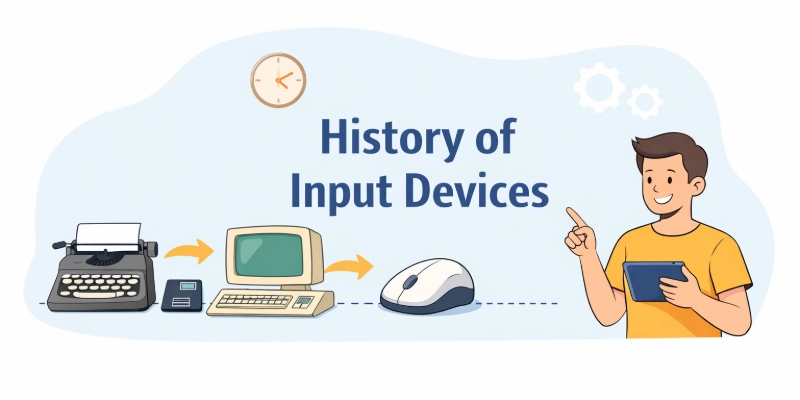
People have used different tools to communicate with computers since the early days of computing. Early machines required simple and mechanical ways to enter instructions. Over time, engineers introduced faster and easier devices that improved human and computer interaction. Today, modern systems use many advanced tools that make data entry quick and convenient.
- Early Keyboards: Early computers used large keyboards that looked similar to typewriters. These devices allowed users to enter text commands and basic instructions into the system.
- Punch Cards Era: In the early stages of computing, operators used punch cards to feed information into machines. Small holes on the cards represented data that computers could read.
- Computer Mouse: Researchers introduced the mouse in the 1960s to make navigation easier. This device helped users control the screen pointer and interact with graphical interfaces.
- Touchscreen Technology: Developers later created touchscreens that allowed people to control devices by simply touching the display with their fingers.
- Voice Input Tools: Modern systems now support microphones and voice recognition software that allow users to give spoken commands.
- Motion Sensors: New technologies include sensors that detect hand movement and body gestures, which help users interact with computers without physical contact.
How Input Devices Work
Input devices help a person communicate with a computer in a simple way. When someone presses a key, moves a mouse, or speaks into a microphone, the device captures that action. The computer then receives the signal and prepares it for processing. This process allows the system to understand what the user wants to do.
- Signal Detection: Input hardware senses a physical action such as a key press, finger tap, or pointer movement and captures that activity before sending it forward to the computer.
- Data Conversion: The device changes the captured action into digital signals that the computer system can understand and process during operation.
- Command Transfer: After conversion, the device sends the information to the computer through cables or wireless connections so the system can receive the command.
- System Recognition: The operating system identifies the incoming signal and decides which program or function should respond to that input.
- Processing Support: The processor then uses the received instruction to perform tasks such as opening files, typing text, or controlling software tools.
- User Feedback: The computer shows the result of the action on the screen or through sound, which lets the user know that the system accepted the command.
Importance of Input Devices
Input devices play a major role in daily computer use. They allow people to control systems and perform tasks quickly. Without them, a computer cannot receive instructions from a user. These tools make digital work easier, faster, and more practical for everyone.
- User Interaction: Input tools allow people to control software, write documents, search information, and operate programs through simple physical actions.
- Task Efficiency: Devices such as keyboards, scanners, and touch panels help users complete work quickly and reduce the time needed to enter information.
- Data Entry: Many workplaces rely on input hardware to enter numbers, records, images, and other details into computer systems for storage and processing.
- Learning Support: Students and teachers use input tools during online learning, research work, and digital assignments to communicate with educational software.
- Creative Work: Designers, editors, and content creators depend on input equipment to draw, type, record audio, and produce digital projects.
- Technology Access: These devices allow people of different skill levels to operate computers, which makes technology more useful and accessible in daily life.
Types of Input Devices
Different input devices help users send information to a computer in various ways. Some devices work with typing, while others capture images, sound, or touch. Each tool serves a specific purpose during computer use. Learning about these devices helps people choose the right tool for different tasks.
- Text Entry Devices: Tools such as keyboards allow users to type letters, numbers, and symbols to create documents, messages, and commands inside computer programs.
- Pointing Control Devices: Equipment like a mouse or touchpad helps users move a pointer on the screen, select options, open files, and control software features.
- Image Capture Devices: Hardware such as scanners and digital cameras collects pictures or printed content and transfers that visual data into the computer system.
- Audio Input Devices: Devices like microphones record voice or sound and send that information to applications used for communication, recording, or voice commands.
- Touch Based Devices: Screens with touch capability allow people to tap, swipe, or press directly on the display to control apps and perform actions.
- Motion Sensing Devices: Modern tools detect hand movement or body gestures, which allows users to interact with computers or gaming systems without using traditional controls.
Common Interface Connections
Input devices connect to computers through different types of interfaces. These connections allow the device to send signals and instructions to the system. Over time, technology introduced faster and more reliable connection methods. Knowing these interfaces helps users connect devices correctly and avoid compatibility issues.
- USB Connection: Universal Serial Bus remains one of the most common ways to attach keyboards, mice, scanners, and many other devices to modern computers.
- Wireless Links: Many modern tools use wireless technologies such as Bluetooth or radio signals, which allow users to connect devices without physical cables.
- PS/2 Ports: Older desktop computers used dedicated PS/2 connectors for keyboards and mice, which provided stable communication between the device and the system.
- Touch Interfaces: Smartphones, tablets, and some laptops use built-in touch panels that connect internally to the system and send touch signals directly to the processor.
- Audio Jack Inputs: Microphones and some voice input tools connect through audio ports that allow the computer to capture sound signals from external devices.
- Network Based Connections: Some advanced input equipment communicates through local networks, which allows devices to send information to computers over internet or LAN systems.
Advantages of Input Devices
Input devices make computer use easier and more practical for people. They allow users to control programs, enter information, and interact with digital systems smoothly. Without these tools, a computer cannot receive commands from a person. Their presence improves productivity and supports many daily digital activities.
- Fast Communication: These tools allow users to send commands and information to the computer quickly, which helps complete tasks without unnecessary delays.
- Easy Operation: Devices such as keyboards, touchscreens, and pointing tools make computer control simple for beginners and experienced users.
- Improved Productivity: Offices, schools, and businesses rely on these devices to enter data, manage records, and perform work more efficiently.
- Better Accuracy: Input equipment allows users to enter information with greater precision, which reduces mistakes during typing, scanning, or recording tasks.
- Creative Opportunities: Artists, designers, and editors use specialized input tools to draw, record audio, and produce digital content.
- Wide Accessibility: These devices help people with different skill levels interact with technology and complete tasks in education, work, and daily life.
Disadvantages of Input Devices
Input devices improve computer interaction, but they also bring certain limitations. Some tools require training before users can operate them properly. Technical problems or damage can also interrupt computer work. Understanding these drawbacks helps users choose and maintain devices more carefully.
- Learning Difficulty: Some equipment requires practice before a user can control it comfortably, especially tools used for design, gaming, or professional work.
- Hardware Damage: Physical parts such as keys, buttons, or sensors may wear out over time, which can reduce the device’s performance.
- Connection Problems: Faulty cables, weak wireless signals, or incorrect ports sometimes prevent the device from communicating with the computer.
- Cost Factors: Advanced input equipment with modern features may cost more, which can increase the overall expense of computer systems.
- Limited Compatibility: Certain devices only function with specific operating systems or software, which may restrict their use on different machines.
- Maintenance Needs: Dust, moisture, or frequent handling can affect device performance, so users often need regular cleaning and care.
Everyday Uses of Input Devices
People use input devices in many daily computer activities. These tools allow users to send instructions and information to digital systems. From work tasks to entertainment, they support many digital actions. Their presence makes computer interaction simple and practical for different users.
- Office Work: Employees use keyboards, pointing tools, and scanners to prepare documents, manage records, and handle routine office tasks on computers.
- Online Communication: People use microphones, cameras, and keyboards to send messages, record voice, and join video meetings on digital platforms.
- Educational Activities: Students and teachers rely on typing tools, touch screens, and digital pens while completing assignments, presentations, and online lessons.
- Creative Projects: Designers and content creators operate drawing tablets, cameras, and audio devices to produce graphics, videos, and sound recordings.
- Retail Operations: Stores use barcode scanners and touch systems to process payments, track products, and manage sales transactions.
- Home Entertainment: Users control games, search media, and interact with streaming services through controllers, remotes, and other interactive tools.
Tips for Choosing Input Devices
Choosing the right input device makes computer work easier and more efficient. The correct tool matches your needs, tasks, and comfort level. Using a suitable device reduces mistakes and increases productivity. Paying attention to features and compatibility helps users make better decisions.
- Consider Your Tasks: Think about the type of work you will do most, such as typing, drawing, or gaming, and select a device designed for that purpose.
- Check Compatibility: Make sure the device works with your computer’s operating system, software programs, and connection ports before buying.
- Evaluate Comfort Level: Choose equipment that feels comfortable to use for long periods, especially keyboards, mice, or touch devices that you will handle daily.
- Look at Durability: Select devices made from quality materials that can withstand frequent use without wearing out or breaking easily.
- Assess Features: Consider extra functions such as programmable keys, ergonomic design, or multi-touch support that can improve efficiency and ease of use.
- Set a Budget: Balance cost and quality, ensuring you get a reliable device that fits your needs without spending more than necessary.
Conclusion
In this guide, we have covered what is input devices. These tools let us send instructions and information to computers, making work easier and faster. At the same time, they can have limits like hardware wear, connection issues, or compatibility problems. I personally recommend choosing devices that fit your needs and taking care of them regularly. By doing this, you can enjoy smooth, efficient, and safe computer use. Thank you for reading, and I hope this guide helped you understand input devices better.
FAQS: What is Input Device
Input devices are tools that allow you to send commands and information to a computer. Examples include keyboards, mice, scanners, and touchscreens. They are the first step in interacting with any computer or digital system.
Input devices capture user actions like typing, clicking, or touching. They convert these actions into digital signals that the computer can understand. This process allows the computer to perform tasks based on your instructions.
Input devices make it possible to control software and enter data efficiently. Without them, computers cannot understand user commands. They help improve productivity, learning, and digital communication.
The main types include keyboards, mice, scanners, touchscreens, microphones, and motion sensors. Each type is designed for a specific way of interacting with the computer. Knowing these types helps you choose the right device for your tasks.
Yes, input devices can sometimes fail due to wear, damage, or connection problems. Regular maintenance and careful handling reduce these risks. Choosing high-quality devices also ensures long-lasting performance.
Wireless devices like Bluetooth keyboards and mice offer convenience and less cable clutter. However, they may face signal interference or battery issues. Wired devices are usually more stable and require less maintenance.
Beginners should consider the task, comfort, durability, and compatibility with their system. Devices like ergonomic keyboards or responsive mice improve ease of use. Testing devices before purchase can help ensure they meet your needs.




- Be Respectful
- Stay Relevant
- Stay Positive
- True Feedback
- Encourage Discussion
- Avoid Spamming
- No Fake News
- Don't Copy-Paste
- No Personal Attacks
- Be Respectful
- Stay Relevant
- Stay Positive
- True Feedback
- Encourage Discussion
- Avoid Spamming
- No Fake News
- Don't Copy-Paste
- No Personal Attacks
