What is Computer Hardware Full Guide for Beginners
Published: 22 Mar 2026
Computers run on physical parts that you can see and touch every day. These parts include the keyboard, monitor, processor, motherboard, and storage devices, and each one plays an important role in system performance. Without these components, no software can run or complete any task. From my experience, understanding these physical parts makes it much easier to use, upgrade, and fix a computer. When you know how each part works, you can solve small problems on your own and make better decisions. In this guide, I will explain what is computer hardware and how these components work together to make your system function smoothly and efficiently.
Definition of Computer Hardware
Computer hardware refers to the physical parts of a computer that you can see and touch in real life. These components include both internal parts like the processor and memory, and external devices like the keyboard and monitor. All these parts work together to run programs and perform different tasks smoothly. From my experience, when you understand hardware clearly, you can use your system more confidently and fix small issues without stress. It also helps you choose the right components when upgrading or buying a new computer.
- Physical visible components: Includes parts you can see and handle like monitor, keyboard, and system unit.
- Internal working parts: Covers CPU, RAM, motherboard, and storage devices inside the computer.
- Connected external tools: Refers to devices like mouse, printer, and speakers used with the system.
- System support structure: Provides the base that allows all operations to run properly.
- Enables task processing: Helps the computer perform actions by supporting software and instructions.
History of Computer Hardware
Computer hardware has gone through major changes over time. Early computers were very large and used simple mechanical parts to perform basic tasks. As technology improved, new components made systems faster, smaller, and more reliable. I have seen how modern devices now fit in our hands while offering powerful performance. Learning this history helps you understand how current computers became so efficient and user-friendly.
- Mechanical calculating devices: Early tools used for basic arithmetic operations before electronic systems.
- First electronic machines: Large systems that relied on early electrical components for processing.
- Shift to compact components: Introduction of smaller parts that improved speed and reduced size.
- Advancement in chip design: Development of powerful microchips that increased processing capability.
- Portable modern systems: Lightweight devices designed for everyday use with high performance.
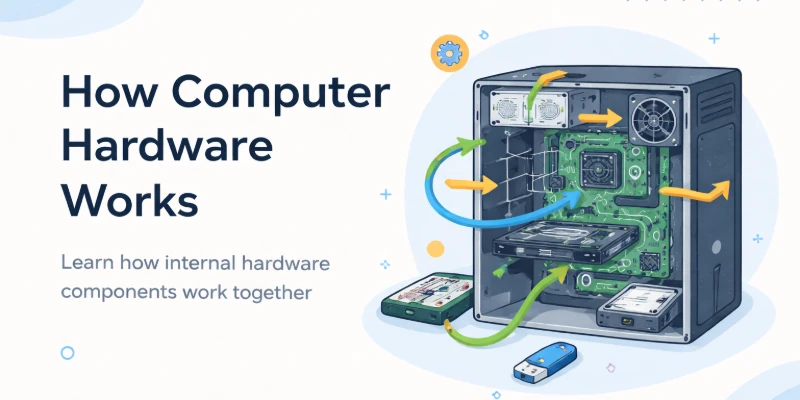
How Computer Hardware Works
Computer hardware works by handling every task in a clear step-by-step process. Each part has its own role, and all components work together to complete actions quickly. When you give a command, the system receives it, processes it, and shows the result in seconds. I have seen how understanding this process makes it easier to use and troubleshoot a computer. Knowing how hardware works also helps you make better decisions when upgrading or fixing your system.
- Instruction signal flow: Commands move through different components in an organized path to complete tasks correctly.
- Processing control unit: The CPU manages operations and ensures every instruction runs in the correct order.
- Temporary data handling: Memory stores active data so the system can access it quickly during tasks.
- Component communication system: Hardware parts exchange information through connections to stay synchronized.
- Output generation process: The system converts processed data into results you can see or hear clearly.
- Permanent data storage: Storage devices keep files and programs safe for long-term use and access.
Types of Computer Hardware
Computers rely on several types of hardware to function efficiently. Each component plays a specific role, from taking input to processing data and producing output. Understanding these types helps you use your system more effectively and troubleshoot problems when they arise. From my experience, knowing the purpose of each hardware type makes learning computers much easier and more practical.
- Input device functions: Hardware like keyboards and mice allow users to send commands and data into the computer.
- Output device roles: Monitors, printers, and speakers display or deliver processed information in usable formats.
- Processing unit tasks: CPUs and GPUs handle calculations, execute instructions, and manage overall operations efficiently.
- Storage device purposes: Hard drives, SSDs, and other drives keep data and programs safe for short-term or long-term use.
- Communication hardware uses: Modems, routers, and network cards connect systems for data transfer across devices and networks.
- Power and support systems: Components like power supplies and cooling systems ensure hardware runs smoothly and stays protected.
Importance of Computer Hardware Devices
Computer hardware devices are the backbone of every system, allowing software and applications to function properly. Without these physical components, tasks like data processing, communication, and storage would be impossible. Understanding their importance helps users choose the right tools and maintain systems effectively. From my experience, knowing why each device matters can improve productivity and prevent technical problems.
- Essential for operation: Hardware provides the foundation that enables computers to run software and perform tasks.
- Supports data processing: Devices like the CPU and memory handle calculations and instructions efficiently.
- Enables user interaction: Input and output hardware allow users to communicate with the computer seamlessly.
- Stores critical information: Storage devices keep important files and programs accessible for future use.
- Facilitates network connections: Communication hardware enables fast data transfer and connectivity between systems.
- Enhances overall performance: Quality hardware ensures tasks are completed quickly, reliably, and without interruptions.
Uses of Computer Hardware Devices
Computer hardware devices are used in many areas of daily life and work. They help us enter data, process information, display results, and store important files efficiently. Each device has a specific role that makes tasks faster and easier. From my experience, understanding how these devices are used can improve productivity and make technology more accessible.
- Data input operations: Hardware like keyboards, mice, and scanners allow users to enter commands and information into the system.
- Information processing tasks: CPUs and GPUs process complex calculations and instructions to complete operations quickly.
- Visual and audio output: Monitors, printers, and speakers present results in clear and understandable forms for users.
- Data storage management: Hard drives, SSDs, and flash drives keep important files safe for short-term or long-term access.
- Network and communication: Modems, routers, and network cards enable data transfer and system connectivity across locations.
- System efficiency support: Power supplies, cooling systems, and backup devices maintain smooth operation and prevent failures.
Advantages of Computer Hardware Devices
Computer hardware devices play an important role in making computers fast and efficient. They help users handle large amounts of data and complete tasks more quickly. Good hardware improves productivity and ensures smooth performance for both work and personal use. From my experience, knowing these advantages helps you choose the right components wisely. The right hardware can save time, reduce mistakes, and make computing much easier.
- Speeds up processing large data tasks
- Enhances reliability for daily computer use
- Improves interaction between user and system
- Supports running complex software programs
- Reduces cost of repairs and maintenance
Disadvantages of Computer Hardware Devices
While computer hardware devices bring many benefits, they also have some limitations. High-quality components can be expensive and may require regular maintenance to work efficiently. Some hardware may become outdated quickly, forcing users to upgrade often. From my experience, not understanding these drawbacks can lead to wasted money and unnecessary frustration. Being aware of these disadvantages helps users make smarter choices when selecting or using hardware.
- Can be costly to purchase advanced devices
- May require frequent maintenance and care
- Hardware can become outdated very quickly
- Some devices may cause physical strain
- Replacement parts are not always available
Conclusion what is computer hardware devices
In this guide, we have covered what computer hardware devices. Understanding both the advantages and limitations of these devices helps you use your system more effectively and avoid common mistakes. By knowing how each component works, you can make smarter decisions when choosing hardware and ensure your computer performs at its best. I personally recommend selecting components that fit your needs, taking proper care of them, and updating them when necessary to balance performance and risks. Paying attention to maintenance and usage habits can also extend the life of your system and prevent unnecessary costs. Thank you very much for reading this guide and dedicating your time to learn more about computer hardware. Don’t skip the next part of the FAQs. I hope you will find something more interesting, so don’t miss it. If you miss it, you may lose something new.
FAQs:What is computer hardware devices
Computer hardware devices are the physical parts of a computer system that you can touch and see. They include components like the CPU, RAM, storage drives, and input/output devices. These devices work together to make your computer functional and efficient.
Computer hardware devices are important because they control how fast and efficiently your computer works. Good hardware allows smooth operation of programs and tasks. Without proper hardware, computers can slow down or fail to run software correctly.
The main types of computer hardware devices include input devices, output devices, processing units, storage devices, and communication devices. Each type has a specific role in the computer system. Together, they make computing possible for everyday tasks and professional work.
Computer hardware devices work together by exchanging data and instructions. The CPU processes information, memory stores it temporarily, and input/output devices allow communication with the user. This teamwork ensures that your computer completes tasks quickly and accurately.
Yes, many computer hardware devices can be upgraded to improve performance. Common upgrades include adding more RAM, replacing a hard drive with an SSD, or installing a better graphics card. Upgrading allows your computer to run newer software and handle more demanding tasks.
If a computer hardware device fails, the system may slow down, crash, or stop working completely. Hardware issues can affect storage, processing, or display functions. Regular maintenance and monitoring can prevent many problems before they become serious.
Choose computer hardware devices based on your needs, budget, and intended use. For example, a gaming PC may require a strong graphics card, while office work may need more storage and memory. Researching compatibility and performance helps ensure the best results.





- Be Respectful
- Stay Relevant
- Stay Positive
- True Feedback
- Encourage Discussion
- Avoid Spamming
- No Fake News
- Don't Copy-Paste
- No Personal Attacks
- Be Respectful
- Stay Relevant
- Stay Positive
- True Feedback
- Encourage Discussion
- Avoid Spamming
- No Fake News
- Don't Copy-Paste
- No Personal Attacks
