Difference Between Hub and Switch Powerful Pros and Cons.
Published: 11 Mar 2026
In computer networking, devices are used to help computers communicate and share data with each other. When multiple computers need to exchange information such as files, messages, or internet access, they rely on networking devices to make this communication possible. Two of the most basic and commonly discussed networking devices are the hub and the switch. Understanding the difference between hub and switch is important for learning how data moves within a network.
A hub and a switch are both used to connect multiple computers within a network. Their main purpose is to allow data to travel from one computer to others. However, the way they handle and deliver this data is different, which directly affects network speed, efficiency, and overall performance.
What Is a Hub?
A hub is a simple networking device that connects multiple computers or devices in one network. Its main job is to help devices share data with each other, but it does this in a very basic way. Hubs were commonly used in early and small networks before smarter devices became available.
How a Hub Works (Easy Points):
- Works at the Physical Layer (OSI Model): A hub works at the lowest level of networking. It only receives and sends signals and does not understand which device should get the data.
- Data Broadcasting: When one computer sends data, the hub forwards that data to all connected devices, even if the data is meant for only one device.
- Collision Issue: If two devices send data at the same time, their signals collide. This collision causes data loss and slows down the network.
- Half-Duplex Communication: A hub allows data to move in only one direction at a time. Devices cannot send and receive data simultaneously.
- Real-Life Analogy: A hub is like a loudspeaker in a room. One message is announced to everyone, whether they need it or not.
What Is a Switch
A switch is a smart networking device that connects multiple computers or devices in a network and sends data only to the device it is meant for. Unlike a hub, a switch does not broadcast data to everyone. This makes the network faster, safer, and more efficient.
How a Switch Works (Step-by-Step in Simple Words):
- Works at the Data Link Layer (OSI Model):
A switch works at a layer where it can understand device identities. It does not just pass signals; it makes decisions about where data should go. - Role of MAC Address:
Every device has a MAC address, which is like a unique home address. The switch reads this address to know exactly which device should receive the data. - MAC Address Table (Address Book Example):
The switch keeps a small table that stores MAC addresses and their ports. Just like a phone contacts list, it quickly looks up the address and sends data to the correct device. - Full-Duplex Communication:
A switch allows devices to send and receive data at the same time, which improves speed and reduces waiting. - Efficient Data Delivery:
Because data goes only to the required device, network traffic is reduced and data collisions are almost eliminated.
Real-Life Analogy:
A switch is like a smart post office that delivers each letter only to the correct house instead of announcing it to the whole neighborhood.
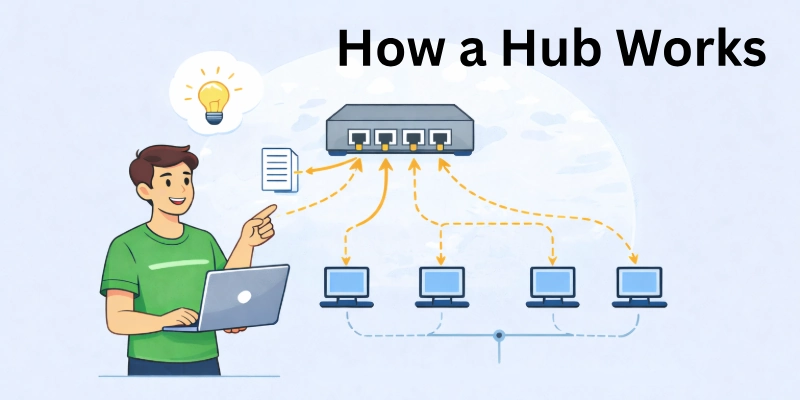
How a Hub Works
A hub is one of the simplest networking devices. It doesn’t understand or filter the data it receives; it simply forwards it to all connected devices. Because of this, it’s often called a dumb device in networking terms. Hubs were widely used in early networks, but they have limitations compared to switches.
Step-by-Step Working of a Hub:
- Data Sent from a Computer: When a computer or device on the network sends data, the hub immediately receives it. It doesn’t analyze the data; it only acts as a middle point.
- No Checking or Filtering: The hub doesn’t check addresses or decide which device should get the data. It ignores the MAC address or the content of the message, treating all incoming data the same.
- Broadcast to All Ports: Once received, the hub sends the data to all connected devices. Every port gets the same message at the same time, regardless of which device it is meant for.
- Target Device Accepts, Others Ignore: Only the device for which the data was intended actually reads it. All other devices ignore the message, but it still uses network bandwidth.
- Network Consequences: Broadcasting to all devices can create unnecessary traffic, slow down the network, and cause collisions when multiple devices try to send data at the same time. This is why hub-based networks can be inefficient, especially as more devices are added.
Real-Life Analogy:
Think of a hub as a loudspeaker in a classroom. When the teacher speaks through it, every student hears the message, even if only one student needs it. The rest of the class listens but doesn’t act on it.
Summary:
Hubs are simple and easy to use, but their broadcast method makes them suitable only for small or outdated networks. Modern networks prefer switches, which send data only to the intended device, reducing collisions and improving efficiency.
Key Points:
- Hub is a dumb device; it forwards all data to everyone.
- No checking of MAC addresses or filtering.
- Data broadcasted to all ports; only the target device reads it.
- Can cause network collisions and slower performance.
- Suitable for small or legacy networks, less common today.
How a Switch Works
A switch is a smart networking device. Unlike a hub, it doesn’t send data to every device. Instead, it forwards data only to the intended recipient, reducing collisions and unnecessary traffic. This makes networks faster and more efficient.
Step-by-Step Working of a Switch:
- Data Sent from a Computer: When a device sends data, the switch receives it immediately, just like a hub.
- Check MAC Address Table: The switch maintains a MAC address table, which stores unique addresses of all connected devices. This helps it know where each device is located on the network.
- Decide the Port: Using the MAC address table, the switch decides which port to forward the data to. Only the port connected to the intended device receives the message.
- Forward to Target Device Only: The intended device gets the data. Other devices ignore it. This prevents unnecessary traffic on the network.
- Efficient and Collision-Free: Because data goes only to the target device, collisions are minimized and overall network speed improves.
Real-Life Analogy:
Think of a switch as a smart post office. Every letter is delivered only to the house with the correct address. No one else gets it, unlike a hub that shouts the message to everyone.
Key Benefits Over Hub:
- Sends data only to the intended device.
- Reduces network congestion and traffic.
- Minimizes collisions, making the network faster and more reliable.
- Ideal for modern networks with multiple devices.
Key Differences Between Hub and Switch
To understand which device is better for a network, this table highlights the main differences between a hub and a switch in simple, practical terms.
| Feature | Hub | Switch |
| OSI Layer | Physical Layer (Layer 1) | Data Link Layer (Layer 2) |
| Data Transmission | Broadcasts to all devices | Sends only to the intended device using MAC addresses |
| Speed | Slower due to collisions and shared traffic | Faster; dedicated path for each device |
| Security | Low – data sent to all devices | Higher – data only reaches target device |
| Collision | More frequent due to shared bandwidth | Minimal, especially with full-duplex |
| Cost | Cheaper, basic device | Slightly more expensive, but worth the efficiency |
| Duplex Mode | Half-duplex only (one direction at a time) | Full-duplex supported (both directions simultaneously) |
| Efficiency | Less efficient; network slows with more devices | Efficient; reduces unnecessary traffic and improves speed |
Hub vs Switch: Performance and Security Comparison
When setting up a network, choosing between a hub and a switch can affect both speed and security. These two devices may look similar, but they handle data very differently. Understanding their differences helps beginners pick the right option for home or office networks.
1. Network Speed Difference:
- Hub: Sends (broadcasts) data to all devices connected to it. Every device receives all the information, even if it’s not meant for them. This creates unnecessary traffic and slows down the network.
- Switch: Sends data only to the device that actually needs it. This reduces network congestion and improves speed, especially when many devices are connected.
- Example: On a hub, streaming a video while someone else downloads a file may make both slower. On a switch, each device gets its own “lane” for data.
- Analogy: Hub = a loudspeaker announcing a message to everyone in a room; Switch = a smart mail delivery sending letters only to the correct person.
2. Data Security:
- Hub: Since it broadcasts data to all devices, sensitive information can be easily intercepted. Anyone on the network could potentially “listen in.”
- Switch: Directs data only to the intended device, making it much harder for attackers to access information.
- Example: On a hub, a password sent over the network could be captured by another device. On a switch, it reaches only the correct device.
- Analogy: Hub = shouting a secret in a crowded room; Switch = handing a sealed envelope to a single person.
3. Traffic Handling & Efficiency
- Hub: All devices share the same communication line, so too many devices can cause collisions and delays.
- Switch: Each device can communicate independently, often simultaneously (full-duplex), which makes data flow smoother.
- Example: In a busy office, a hub might slow down if many computers are transferring files at once. A switch manages the traffic efficiently.
- Analogy: Hub = everyone trying to talk over each other in one conversation; Switch = each person speaks in their own lane without interference.
Packet Sniffing & Security Risks
- Hub: Because data is broadcast to every device, hackers or unauthorized users can capture information easily.
- Switch: Limits data delivery to the intended recipient, reducing opportunities for interception.
- Example: On a hub, shared files or login credentials are more exposed. On a switch, only the target device sees the data.
- Analogy: Hub = leaving letters on a public table; Switch = sending sealed letters directly to specific people.
Key Takeaway
Switches are faster, more secure, and more efficient than hubs. They reduce unnecessary traffic, prevent collisions, and protect sensitive data. Hubs were popular in early networks but are mostly obsolete today. Beginners should understand that switches are the preferred choice for modern home, office, and school networks.
Advantages and Disadvantages of Hub
Hubs are simple networking devices that connect multiple computers, but they have both benefits and drawbacks. Understanding these helps beginners decide when a hub might be suitable.
Pros
- Cheap: Hubs are low-cost, making them affordable for small or temporary networks.
- Easy to Use: No special setup or configuration is needed; just plug and play.
- Simple Connectivity: Good for very basic networks where speed and security are not critical.
Cons
- Low Security: Data is sent to all connected devices, so sensitive information can be intercepted easily.
- High Collision Rate: If multiple devices send data at the same time, collisions occur, slowing down the network.
- Inefficient Traffic Handling: Hubs forward all data to every port, creating unnecessary network traffic.
- Limited Performance: Not suitable for modern networks with many devices or high-speed requirements.
Practical Note:
Hubs are mostly used today for very small, simple networks or temporary setups. For better speed, security, and efficiency, switches are usually the preferred choice.
Advantages & Disadvantages of Switch
Switches are smart networking devices that manage data more efficiently than hubs. They help devices communicate faster, more securely, and with less network congestion. While they have many advantages, there are some trade-offs beginners should know.
Advantages (Pros):
- Faster Communication: Switches send data only to the intended device rather than all devices. This reduces delays and improves overall network speed.
- Example: In an office, sending a file to one computer doesn’t slow down other devices
- Better Security: Since data is directed to specific devices, it is harder for unauthorized users to intercept information.
- Example: Passwords or sensitive files are safer compared to a hub.
- Efficient Traffic Handling: Switches reduce unnecessary network traffic and collisions, keeping the network smooth and reliable.
- Example: Multiple users streaming videos or transferring files won’t slow each other down as much.
- Scalability: You can easily add more devices without major performance drops, making switches ideal for growing networks.
- Full-Duplex Support: Data can travel in both directions simultaneously, increasing speed and efficiency.
Cons
- Higher Cost: Switches are more expensive than hubs, which can be noticeable for small or temporary networks.
- Slightly More Complex Setup: Although beginner-friendly, switches may require some configuration for advanced features, unlike plug-and-play hubs.
- Power Requirement: Some managed or larger switches may need dedicated power sources, adding to setup considerations.
Practical Note:
Switches are widely used in modern networks — homes, offices, and schools — because they are fast, secure, and efficient. Beginners should prefer switches over hubs for any network that handles multiple devices or sensitive data.
Hub vs Switch vs Router
Hub, switch, and router are three different networking devices, and each one plays a unique role in how data moves across a network. Understanding their differences helps beginners know which device is used where and why.
Quick Comparison (Beginner-Friendly)
Primary Function
- Hub: Broadcasts data to all connected devices, without checking who needs it.
- Switch: Smartly forwards data only to the intended device.
- Router: Connects different networks and decides the best path for data (for example, LAN to Internet).
OSI Layer
- Hub: Physical Layer (just passes signals).
- Switch: Data Link Layer (uses MAC addresses).
- Router: Network Layer (uses IP addresses).
Data Handling
- Hub: Sends data to everyone, causing unnecessary traffic.
- Switch: Sends data only to the target device, reducing traffic.
- Router: Routes data between different networks efficiently.
Security Level
- Hub: Low (data visible to all devices).
- Switch: Medium (data sent to specific devices).
- Router: High (controls and filters traffic between networks).
Typical Use Case
- Hub: Small or temporary networks (rarely used today).
- Switch: Local networks in offices, schools, and homes.
- Router: Internet connection for home and enterprise networks.
Simple Real-Life Analogy
- Hub: Like a loudspeaker that announces everything to everyone.
- Switch: Like a smart post office delivering letters to the correct address.
- Router: Like traffic police or GPS, deciding which road data should take.
Conclusion
In this guide, we have covered the difference between hub and switch. From my experience, choosing the right device reduces network problems and improves data flow. We can manage risks by using switches for modern networks and avoiding hubs where security matters.
Thank you for staying with this guide, and I wish you smooth learning ahead. Don’t skip the next part of the FAQs. I hope you will find something more interesting, so don’t miss it. If you miss it, you may lose something ne
FAQs
People often have common questions about.Difference Between Hub and Switch These short FAQs provide simple and clear answers.
A hub sends data to all connected devices at the same time. A switch sends data only to the intended device. This is the main difference between hub and switch and why switches are faster.
A hub is a basic networking device that connects multiple computers. It does not understand or filter data. That is why the hub is often explained as a broadcasting device.
A switch is a smart networking device that forwards data to the correct device. It uses MAC addresses to make decisions. This makes switching an important topic in modern networks.
Hubs are mostly outdated now. They are used mainly for learning or very small temporary networks. In real environments, switches are preferred.
A switch sends data only to the target device. Other devices cannot see that data. This reduces the risk of data interception compared to a hub.
A hub broadcasts every message to all devices. This causes more collisions. As a result, network speed becomes slow.
A switch reduces unnecessary traffic. Each device receives only its own data. This makes the network faster and more reliable.





- Be Respectful
- Stay Relevant
- Stay Positive
- True Feedback
- Encourage Discussion
- Avoid Spamming
- No Fake News
- Don't Copy-Paste
- No Personal Attacks
- Be Respectful
- Stay Relevant
- Stay Positive
- True Feedback
- Encourage Discussion
- Avoid Spamming
- No Fake News
- Don't Copy-Paste
- No Personal Attacks
