Computer Network Powerful Benefits and Serious Risks Today.
Published: 11 Mar 2026
Many people get confused when they hear different terms like DSL, fiber, cable, satellite, or mobile data and don’t know which option is best for their needs. Choosing the right connection can feel overwhelming, especially when every provider claims to offer the “fastest speed.” Don’t worry this guide will clear things up in a simple way. In this article, you’ll learn how to choose from different Types of Internet Connections with easy explanations and step-by-step help. By the end, you’ll know exactly which connection fits your home, work, or mobile use.
Importance of Computer Networks
Computer networks are important because they allow people and devices to connect, share data, and communicate quickly from anywhere. They help businesses work faster by enabling file sharing, online collaboration, and centralized storage. Networks also make it easier to access information, whether through the internet or internal company systems.
In schools and offices, networks improve learning and productivity by connecting computers, printers, and other resources. They also support online services like email, cloud storage, and video conferencing. Overall, computer networks play a key role in modern technology, making communication and work more efficient.

Types of Computer Network
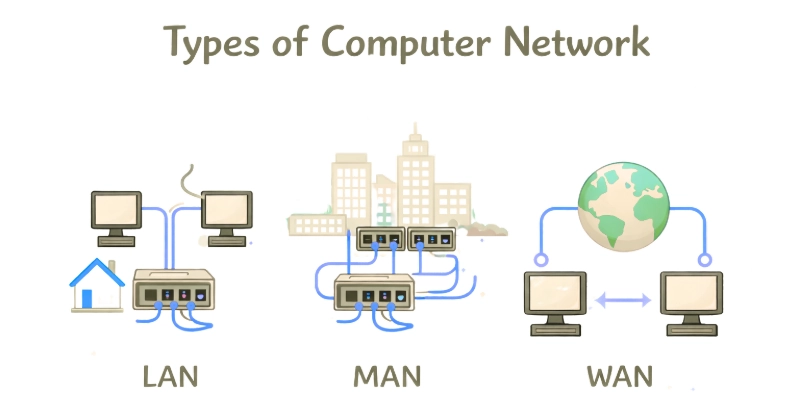
Computer networks come in different types based on how far they cover and how they are used. Each type has its purpose and benefits.
- LAN (Local Area Network)
Small spaces like homes, offices, and schools use LANs. It links computers in the area so they can share files, printers, and the internet.
- WAN (Wide Area Network)
The wide-area network (WAN) connects multiple local area networks (LANs) across cities, nations, or even the entire globe. The largest example of a WAN is the internet
- MAN (Metropolitan Area Network)
The wide-area network (WAN) connects multiple local area networks (LANs) across cities, nations, or even the entire globe. The largest example of a WAN is the internet. It makes use of various communication technologies, such as satellites and fiber optics.
- PAN (Personal Area Network)
PANs, which are used for personal devices within a few meters, are the simplest kind of networks. Examples include using Bluetooth to connect your smartwatch to your smartphone or your phone to your laptop.
- CAN (Campus Area Network)
Within a small campus area, like a university, corporate headquarters, or sizable hospital, a CAN links several LANs. It facilitates quick internal communication between several buildings.
Components of a Computer Network
- Nodes (Devices)
Any device connected to the network, including computers, laptops, printers, and smartphones, is referred to as a node. Within the network, they move, receive, and process data.
- Network Interface Card (NIC)
The NIC allows a device to connect to the network. It can be wired (Ethernet port) or wireless (Wi-Fi card), and it helps convert data into signals that can travel across the network.
- Switch
Every device connected to the network, including computers, laptops, printers, and smartphones, is referred to as a node. Within the network, they move, receive, and process data.
- Router
The router is used to link multiple networks, such as the internet and your home network. In addition to providing security features like antivirus software, it links data transfers to the proper location.
- Cables and Connectors
These include connectors that physically transfer data between devices, fiber-optic cables, and Ethernet cables. In wired networks, they guarantee dependable and steady communication.
- Modem
A modem converts digital data from your network into signals that can be transmitted over telephone lines, cable systems, or fiber connections. It is required in order to access the internet.
- Access Point (for Wireless Networks)
Wireless devices can connect to the network via Wi-Fi due to an access point. It improves coverage and enables cable-free communication.
Computer Network Topologies
- Bus Topology
Each device in this topology is linked to a single central cable called the bus. It requires less wiring and is simple to set up. However, the network as a whole starts to function if the main cable fails.
- Star Topology
All devices are connected to a central device like a switch or hub. It is reliable because if one computer fails, it does not affect others. Yet, the network as a whole fails if the central hub fails.
- Ring Topology
Data flows in a single direction and devices are linked in a circle. While the network is predictable and well-organized, it can be disrupted if a single device or cable breaks.
- Mesh Topology
Every device in a mesh network is linked to every other device. It offers quick communication and excellent dependability. However, because it requires numerous cables, it is costly and difficult to install.
- Tree Topology
This topology combines multiple star networks connected to a main bus line. Although it is flexible and easy to grow, a significant portion of the network may stop functioning if the primary foundation fails.
- Hybrid Topology
A hybrid topology is a mix of two or more topologies, such as combining star and mesh. It is highly scalable and used in large organizations, but it can be costly and complex to manage.
Computer Network Protocols
Computer network protocols are like rules that help devices communicate with each other within a network. They make sure data is sent and received correctly.
Main Computer Network Protocols
- TCP/IP
The internet’s important protocol is TCP/IP. IP manages addressing and routing, while TCP provides dependable data transfer. Together, they make sure data reaches the correct destination safely.
- HTTP
A majority of current websites use HTTPS for safe communication. HTTP is used to load web pages in web browsers, while HTTPS is its secure version that encrypts data to protect user information.
- FTP
Files can be sent and received over a network between computers using FTP. It is common for uploading website files to servers. Encryption is added in secure versions like SFTP and FTPS.
- SMTP
SMTP, which is used for sending emails from one server to another. When you send an email, SMTP handles its delivery to the recipient’s mail server.
- POP3
Emails are received using both. POP3 downloads emails to a device, while IMAP keeps them stored on the server and syncs across multiple devices. IMAP is more commonly used today.
- UDP
Compared to TCP, UDP is a quicker but less reliable protocol. It is employed in applications like online voice calls, streaming videos, and gaming where speed is more important than perfect accuracy.
Applications of Computer Networks
Nearly every aspect of our daily lives involves the use of computer networks. They facilitate rapid service access, collaboration, and information sharing.
Communication
Nearly every part of our daily lives involves the use of computer networks. They facilitate rapid service access, interaction, and information exchange.
Resource Sharing
Through enabling users to share equipment like printers, scanners, storage devices, and software programs, networks lower costs and improve company efficiency.
Data Sharing and Collaboration
Multiple users can access, modify, and share files from any location thanks to networks. This facilitates real-time collaboration, online projects, and teamwork in both businesses and educational institutions.
Online Services
Networks are needed for services like streaming, cloud storage, online banking, and e-commerce. They make it simple for users to access activities, store data, and do financial transactions. nd schools.
Education and E-Learning
Computer networks support digital classrooms, virtual learning platforms, online tests, and access to educational materials. Teachers and students can connect from any place.
Government and Public Services
Networks assist in maintaining track of big databases, public documents, government websites, and online applications for things like passports, ID cards, and tax systems.
Advantages and Disadvantages of Computer Networks
Advantages of Computer Networks
- Remote access
- Easy Communication
- Resource Sharing
- Data backup and storage
- Centralized Data Storage
- Faster Data Access
- Cost-Effective Operations
- Team collaboration
Disadvantages of Computer Networks
- Security Risks
- Virus and Malware Spread
- Network Failure Problems
- High Setup and Maintenance Cost
- Privacy Issues
- Overdependence on Networks
- Limited range in some networks
- Need for maintenance
- Viruses and malware
Conclusion
We’ve covered computer networking in great detail in the article above. Based on everything discussed, I personally recommend choosing a network setup that matches your needs—start small, keep it secure, and expand only when necessary.
FAQs: Computer Network
Let’s look at some common questions people often ask about computer networks to better understand this topic.
A computer network is a system where multiple devices are connected to share data, resources, and communication. It allows computers, phones, and other gadgets to work together easily.
They make communication faster, allow resource sharing, and support online services like email, cloud storage, and video calls. Networks help businesses, schools, and governments work more efficiently.
A LAN (Local Area Network) covers a small area like a home or office.
A WAN (Wide Area Network) covers large distances, connecting many LANs—like the internet.
Common network devices include routers, switches, hubs, modems, access points, and network interface cards (NICs). Each device helps manage and transfer data.
A router connects your local network to other networks, such as the internet. It decides the best path for data to travel and also helps keep your network secure.
Network topology describes the layout or arrangement of devices in a network. Examples include star, bus, ring, mesh, and hybrid topologies.
Networks can face threats like hacking, viruses, unauthorized access, and data theft. Using firewalls, passwords, encryption, and antivirus tools helps protect the network.



- Be Respectful
- Stay Relevant
- Stay Positive
- True Feedback
- Encourage Discussion
- Avoid Spamming
- No Fake News
- Don't Copy-Paste
- No Personal Attacks
- Be Respectful
- Stay Relevant
- Stay Positive
- True Feedback
- Encourage Discussion
- Avoid Spamming
- No Fake News
- Don't Copy-Paste
- No Personal Attacks
