Examples of Secondary Storage Devices Powerful Pros & Cons
Published: 11 Mar 2026
Many users run out of space or lose files because they store everything in one place. These problems push people to learn about examples of secondary storage devices. I faced this issue during heavy work when my system slowed down and important files went missing.
I did not keep proper backups at that time, and it caused stress and wasted hours. Later, I started using external drives and USB storage for extra space and safety. After that change, my data stayed secure and my work became smoother every day.
Secondary Storage Devices
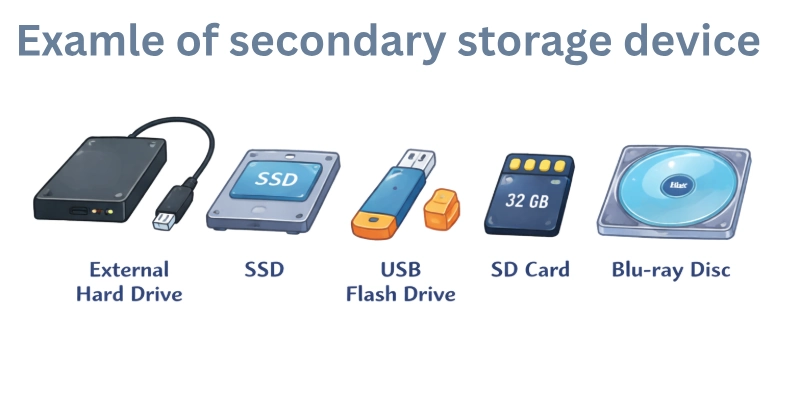
Hardware such as hard drives, SSDs, USB flash drives, memory cards, and DVDs are examples of secondary storage devices that provide large storage capacity for files, software, backups, and media and help users keep their data safe, organized, and easy to access whenever needed. Secondary storage devices are used to store data permanently, even when the computer is turned off.
- Hard Disk Drive (HDD)
- Solid State Drive (SSD)
- USB Flash Drive
- Memory Card (SD Card / MicroSD)
- External Hard Drives
- Network Attached Storage (NAS)
- Magnetic Tape
- Floppy Disk
- Disk Packs
- Compact Disc (CD)
- DVD
- Blu-ray Disc
- USB Flash Drive / Memory Stick
- SD Card
Hard Disk Drive (HDD)
A Hard Disk Drive (HDD) is a traditional secondary storage device that uses spinning magnetic platters to store large amounts of data at a low cost. It provides high capacity, making it ideal for storing videos, software, backups, and heavy files. Although slower than SSDs, HDDs remain popular for their affordability and long-term storage reliability. They are commonly used in desktops, laptops, servers, and external storage systems.
Solid State Drive (SSD)
A Solid State Drive (SSD) is a secondary storage device that uses flash memory to store data, offering far faster read and write speeds than normal HDDs. Due to the absence of moving gadgets, SSDs are more stable and less likely to fail under mechanical failure.
They are ideal for laptops, computer desktops, and gaming PCs since they improve overall system speed, boot times, and program loading. Although being more costly per gigabyte than HDDs, their dependability and performance make them the go-to option for modern computers.
USB Flash Drive
A USB flash drive is a portable secondary storage device that uses flash memory to store and transmit data effortlessly between computers. It is perfect for transporting documents, media, and backups because it is small, strong, and doesn’t need an external power source. It provides quick and easy data access while on the road while having a smaller capacity than HDDs and SSDs.
Memory Card (SD Card / MicroSD)
A memory card, such as an SD or MicroSD card, is a small and compact secondary storage device commonly used in cameras, smartphones, and tablets. It stores photos, videos, apps, and other types of data, making it an easy way to expand your device’s storage.
Despite its tiny size, a memory card offers excellent portability and fast data transfer speeds. It is suitable for both personal use and professional digital storage needs.
External Hard Drives
Large capacity for storage for data, backups, and media is given via external hard drives, which are portable secondary storage devices that connect to PCs by USB or other interfaces.
They give a practical way of increasing storage without having to open a computer. External drives are robust, portable, and appropriate for backup, business, or personal usage. Their enormous capacity makes them excellent for storing huge data sets securely.
Network Attached Storage (NAS)
A dedicated storage device connected to a network, Network Attached Storage (NAS) enables various people and devices to access and share data at the same time. For individuals and businesses, it offers central file management, backup, and storage.
High-capacity drives and data redundancy for security are frequently supported by NAS equipment. They are perfect for safe long-term data storage, media streaming, and teamwork.
Magnetic Tape
Magnetic tape is a type of secondary storage that records data on long strips of magnetic material in a certain order. It is very cost-effective to back up and store large amounts of data for a long time.
Magnetic tape is slower than modern storage devices like HDDs and SSDs, but it is very durable and reliable. People often use it for long-term storage in data centers, businesses, and archival systems.
Floppy Disk
A floppy disk is an old secondary storage device that uses magnetic storage to save small amounts of data, usually between 720 KB and 1.44 MB. In the past, it was used a lot for moving files, making backups, and sharing software.
Floppy disks were very important in the early days of personal computing, even though they were slow and had a small amount of space compared to modern storage devices. Today, they are mostly unused, but they are still an important part of the history of computers.
Disk Packs
Disk packs are durable, removable secondary storage devices made of multiple hard disk platters stacked. They were widely used in mainframe and enterprise systems to store large amounts of data and handle heavy computing tasks. Disk packs made it easy to replace or expand storage without interrupting system operations. Although they played an important role in early large-scale data management, modern storage technologies have mostly replaced them.
Compact Disc (CD)
A Compact Disc (CD) is an optical storage device that stores digital files such as music, software, and documents. It uses laser technology to read and write data, making it reliable for playback and long-term storage.
CDs can hold up to 700 MB of data and are widely used for distributing media. Although not as common today, they are still useful for backups, audio collections, and archiving.
DVD (Digital Versatile Disc)
A DVD (Digital Versatile Disc) is an optical storage medium that can hold much more data than a regular CD, typically up to 4.7 GB. It uses laser technology to store movies, software, games, and backup files with excellent video and audio quality.
DVDs became popular for home entertainment and data sharing because they offer high capacity and long-lasting durability. Modern storage options have reduced their use, yet DVDs continue to be a reliable choice for playing and storing media.
USB Flash Drive / Memory Stick
A USB flash drive, also called a memory stick, is a small secondary storage device that uses flash memory to store and move data. It connects right into a computer’s USB port, which makes it simple and quick to share files.
These drives are tough, simple to carry, and come in a wide range of sizes to meet different storage needs. They are great for carrying documents, media, and backups anywhere because they are easy to use and reliable.
Blu-ray Disc
Blu-ray discs are optical storage devices designed to accommodate large files, such as high-definition and 4K videos. It uses a blue-violet laser, which lets it store more data than DVDs or CDs.
Blu-ray discs have excellent picture and sound quality, which makes them perfect for new films and games. They are still a good choice for people who need to store a lot of media and keep it for a long time.
Conclusion
In this guide, we have covered examples of secondary storage devices. From my experience, smart storage planning reduces risks and protects important files. We can manage common issues by choosing the right device, handling it carefully, and backing up data regularly.
Thank you for staying with this guide, and I wish you safe and smooth computer use. Don’t skip the next part of the FAQs. I hope you will find something more interesting, so don’t miss it. If you miss it, you may lose something new
FAQs
Let’s go through some quick FAQs that people often ask about examples of secondary storage devices. Each answer gives a clear and easy explanation.
Secondary storage devices are hardware used to store data permanently, even when the computer is turned off. They include devices like hard drives, SSDs, USB drives, and memory cards. Unlike primary storage (RAM), they keep data safe for long-term use. They are essential for storing files, backups, and software.
HDDs (Hard Disk Drives) use spinning disks to store data, while SSDs (Solid State Drives) use flash memory. SSDs are faster and more durable because they have no moving parts. HDDs usually offer more storage for a lower price. Choosing between them depends on whether you prioritize speed or storage capacity.
Yes, USB flash drives are portable and easy to use for backing up important files. They don’t need external power and work with most computers. However, their storage is usually smaller than HDDs or SSDs. They are best for quick backups or transferring data between devices.
Memory cards, like SD or MicroSD cards, are small storage devices used in cameras, smartphones, and tablets. They store photos, videos, apps, and other data. They are portable and easy to switch between devices. They are perfect for expanding storage without upgrading your device
Yes, CDs and DVDs can still be used to store music, movies, software, and documents. They are reliable for long-term storage and can be easily shared. However, they have limited capacity compared to modern storage devices. They are ideal for backups or media collections.
NAS is a storage device connected to a network, allowing multiple users to access files at the same time. It is commonly used in homes, offices, and businesses. It provides centralized storage, backups, and easy sharing. NAS is great for collaborative work and media streaming.
Consider your storage needs, budget, and the type of files you store. If you need speed, an SSD is better. For portability, USB drives or memory cards are ideal. For large backups or media collections, HDDs or NAS devices work best. Always check compatibility with your devices before buying.




- Be Respectful
- Stay Relevant
- Stay Positive
- True Feedback
- Encourage Discussion
- Avoid Spamming
- No Fake News
- Don't Copy-Paste
- No Personal Attacks
- Be Respectful
- Stay Relevant
- Stay Positive
- True Feedback
- Encourage Discussion
- Avoid Spamming
- No Fake News
- Don't Copy-Paste
- No Personal Attacks
